GREENBONE – EFFECTIVE VULNERABILITY MANAGEMENT

Cyberattacks always exploit some kind of vulnerability—a software bug, a misconfiguration of the system, an outdated server, or a service long forgotten. We call these vulnerabilities vulnerabilities. They pave the way for ransomware, data leaks, production shutdowns, and GDPR and NIS2 violations.

Therefore, modern IT security is not only about firewall and antivirus, but above all continuous search, assessment and removal of vulnerabilities - That is vulnerability management. This is where solutions come in. Greenbone.


What are vulnerabilities and why do they need to be addressed?


Susceptibility is a weakness in an IT system that an attacker can exploit to:

  • take over an account or the entire environment,
  • encrypt data (ransomware),
  • steal information (personal data, documents, company secrets),
  • stop the operation of production or business systems.


Vulnerability management requires:

  1. Identify weaknesses (scanning networks, systems, applications),
  2. Estimate the risk (what is critical to the business, what can be improved later),
  3. Recommend and implement corrective actions (updates, configuration changes, segmentation, disabling unnecessary services),
  4. Monitor on an ongoing basis, because new vulnerabilities appear every day. 


Without such a cyclical process, even the best-designed infrastructure becomes vulnerable to attacks over time.


Greenbone – open and transparent vulnerability management?


Greenbone (creator of the technology OpenVAS) this the most widely used open-source vulnerability management system provider


Key features of the Greenbone / OpenVAS platform:

  • OpenVAS Scanner – a full-fledged vulnerability scanner supporting multiple protocols, authenticated and unauthenticated tests, designed for large environments.
  • Huge database of security tests – over 150–200 thousand tests (VT), updated daily in the Greenbone Community and Enterprise feeds. 
  • Constant updates – new vulnerabilities and CVEs are enabled on an ongoing basis, allowing for the rapid detection of fresh threats.
  • Complete GVM Platform – in addition to the scanner, components are available for management, scheduling, reporting and integration with other security systems.


What solutions does Greenbone offer?


Below we present a simplified overview of the main product lines – as a Greenbone partner, we can select and implement the right combination for your organization.


1. Appliance / on-premises solutions

  • OPENVAS SCAN / Greenbone Enterprise Appliance – dedicated devices (physical or virtual) for network scanning and vulnerability management.
  • Versions for various sizes of environments – from smaller installations to large organizations and multiple security zones (master/sensor). 

For whom?

These solutions are designed for companies and institutions that expect full on-premises control, integration with existing processes and high scanning efficiency.


2. Greenbone Cloud Service

  • Fully managed cloud service, without having to maintain your own infrastructure.
  • Scanning both public addresses and internal networks (using edge components).
  • Data processed in German data centers, fully compliant with the GDPR. 

For whom?

The cloud service will meet the needs of organizations that want to quickly launch effective vulnerability management, without investing in equipment and a team of specialists.


3. Solutions for SMEs – OPENVAS BASIC

  • OPENVAS BASIC – a simplified, cost-effective solution with pre-configured functions for small and medium-sized businesses. Greenbone+1
  • It focuses on quick startup, clear reporting, and a simple vulnerability remediation process.

For whom?

These systems are dedicated to small and medium-sized enterprises (SMEs) that need enterprise-grade vulnerability scanner, but at a reasonable price and with easy operation.


4. Community / Open Source and accompanying tools

  • OpenVAS Community Edition – free community version, good for tests, labs or smaller environments, with community feed. 
  • OPENVAS REPORT, OPENVAS FREE, OPENVAS AI, Web App Scanning – tools that extend reporting, analytics, web application scanning and use AI for predictive vulnerability management.


Why choose Greenbone over other solutions?


  1. Open source, transparency and no black box„
    Greenbone builds its solutions based on open source – the code is auditable and transparent, which significantly increases trust and helps avoid the "vendor lock-in" phenomenon.
  2. Very broad and up-to-date vulnerability feed
    The Greenbone feed (Community and Enterprise) includes over 150,000–200,000 vulnerability tests, updated daily – allowing the scanner to quickly respond to new CVEs and attack scenarios. 
  3. European supplier, GDPR and regulatory compliance
    Greenbone's development, maintenance, and cloud operations are based in Germany, with a focus on GDPR compliance and ISO standards (including ISO 27001). Customer data in the Greenbone Cloud Service remains under European legal jurisdiction, simplifying compliance and digital sovereignty.
  4. Flexible implementation: from community to enterprise
    The same technology can function as a free community scanner, a data center appliance, a virtualized solution, or a fully managed cloud service. This allows for a small start and then seamless expansion to enterprise scale without replacing the entire platform.
  5. Integration with existing security ecosystem
    Greenbone offers ready-made integrations with firewalls, SIEM, ticketing systems, and monitoring tools (e.g., Nagios, Splunk, Fortinet, Palo Alto, Cisco), among others. This allows scan results to be incorporated into existing SOC/monitoring processes.
  6. Proven technology, large community and references
    OpenVAS/Greenbone is widely used by companies, public institutions and critical infrastructure operators worldwide, and a strong open-source community supports the development and quality verification of solutions. 


UpGreat + Greenbone – how can we help?


As Greenbone partner we connect:

  • Greenbone technology (OpenVAS, appliance, cloud),
  • our design and implementation experience in production, office and hybrid environments,
  • knowledge of NIS2, GDPR and good cybersecurity practices to build customer consistent vulnerability management process – from the first scan, through risk prioritization, to the automation of reporting for management and auditors.


If you want to check, What is the actual vulnerability level in your organization?, contact us – we will prepare a PoC or pilot proposal using Greenbone solutions tailored to your infrastructure.

If you are pressed for time, make an appointment online meeting.

We invite!

SENECA'S CLIFF, THE LIMITS OF DEVELOPMENT, POLISH AI AND POLISH DIGITAL SOVEREIGNTY

Why is energy a limitation?


I was inspired to write this post by two recent books I read: "In Poland, or Everywhere: A Tale of the Decline and Future of the World" by Edwin Bendyk and "Why Nations Fail" by Daron Acemoglu and Robinson James, both of which I highly recommend.

The discussion about AI and Polish digital sovereignty ignores the hard laws of physics – including the ability to harvest energy. With the July White House document, "America's AI Action Plan," which focuses on, among other things, accelerating innovation and expanding the US AI infrastructure, it's worth juxtaposing the question: where does Poland stand in this race and what really limits us? Contrary to appearances, the bottleneck isn't necessarily the number of GPUs, but primarily quantity and quality (availability) of energythat we are able to produce and deliver in accordance with the laws of thermodynamics.

Additional information -> Americas-AI-Action-Plan.pdf

The thesis I wish to substantiate is that the material growth of countries (including Poland)—including AI development—depends on the availability of high-quality net energy. The key indicator here is EROEI (Energy Return on Energy Invested), which is the return on energy invested in its acquisition and delivery.


What is Seneca Cliff?


The most general approach to the barrier to growth, which I believe we are currently encountering, is the concept of the Seneca cliff – introduced in 2017 by Italian scientist Ugo Bardi – which refers to the increasing complexity of a system (civilization) and marks the point at which further growth in structural and functional complexity is impossible. The inescapable laws of physics and biology become barriers to development. According to Ugo Bardi, the approach to the Seneca cliff is manifested by the climate crisis, the collapse of ecosystems, and the rising cost of energy and strategic raw materials.

It's worth noting that the distance from the cliff varies across countries. This is influenced by the complexity of their social systems and the availability of energy and other resources. The Seneca cliff is echoed in the less general concept of the energy cliff, a point at which no more high-quality energy can be produced, necessary to maintain and develop the complex structures of a state.


How does EROEI relate to the complexity of society?


As EROEI declines, we approach the so-called "net energy cliff" – a non-linear threshold where a slight deterioration in energy return dramatically reduces net energy remaining for the rest of the economy (transport, health, education, research – today also data centers and AI).


What does EROEI mean in practice (Hall, Murphy, Tainter et al.)?


Based on research on “net energy”, heuristic thresholds can be adopted:

  • ~3:1 – areas of biological survival (without “surplus” for complex institutions).
  • ~5–7:1 – basic institutions and local organization are possible.
  • ≥~10:1 – safe maintenance of the industrial economy (transport, education, health, digital infrastructure).
  • ~15–20:1+ – significant space for innovation, research and shock absorption.

These values are heuristics resulting from many Hall/Murphy/Tainter papers and analyses that show significant increases in social benefits above the ~20:1 threshold.

According to Edwin Bendyk, EROEI in the late Polish People's Republic was only ~5:1 and this was the reason for the collapse of the economy of the People's Republic of Poland.

More information -> EROI of different fuels and the implications for society


What is EROEI and how has it changed over time?


EROEI is the ratio of energy extracted to energy put in. Historically, this has been high for fossil fuels, but is decreasing with the depletion of the "easiest" deposits and the increasing complexity of energy chains.

  • Coal - EROEI analyses for coal-based electricity generation technologies (on the "electric" side) show values of ~30–35:1 with narrow system boundaries (without full system buffering). Differences in values result from the adopted methodology (e.g. whether we count only extraction/transport and the block itself, or also the network, reserves, storage, decommissioning of energy sources due to their consumption). However, the actual EROEI (energy available for use) may be much lower and in extreme cases in some countries even drop to the value of ~3,5:1.

Additional information -> Energy intensities, EROIs, and energy payback times of electricity generating power plants

  • Oil – long-term studies for the USA confirm a decline in the EROEI of oil/gas from tens of 1 to ~5–15:1 (depending on segment: discovery vs. production).

Additional information -> A New Long Term Assessment of Energy Return on Investment (EROI) for US Oil and Gas Discovery and Production

Attention: EROEI calculated "at source" (raw material) is higher than EROEI "at the use stage" (after all conversions). The latter is more adequate for assessing how much energy is actually left "for the economy."

Additional information > Energy Return on Investment of Major Energy Carriers: Review and Harmonization

If we were to refer to Poland, there is no uniform, official table EROEI of the entire economy (EROI_SOC) for individual EU countries. However, we know that countries with a large share hydro/atomic they usually achieve higher Systemic EROEI than those with a mix dominated by solid fuels. In Poland, a significant portion of the energy mix has historically been based on coal, which – after taking into account unit efficiency and system costs – reduces the "net energy buffer" compared to countries with a high share of high-EROEI and dispatchable sources.

More information -> EROI of different fuels and the implications for society


Can EROEI be determined for economies as a whole?


Since countries use a mix of energy sources, a generalization is used Social EROEI (EROI_SOC). In the literature for developed countries, ranges of the order of ~10–30:1, but the result strongly depends on system boundaries and the method of accounting for energy import/export, losses, power reserves or storage. The greater the share of sources with high EROEI and availability (hydroelectric power plants, nuclear power plants), the greater the "cushion" for maintaining complex institutions.

More information -> EROI of different fuels and the implications for society


Is Poland on the verge of an “energy cliff”?


For an economy with a growing demand for 24/7 available power (industry, digitalization, data centers) energy quality (EROEI, availability, conversion losses) becomes a critical factor. When the rate of growth net energy fails to keep pace with the need to maintain complexity, there is a growing risk of “squeezing” the space for growth and innovation – faster than the total MWh would suggest.

More information -> Energy Return on Investment of Major Energy Carriers: Review and Harmonization


What do AI and data centers need? A hunger for high-quality energy.


IEA (International Energy Agency) estimates that global data center electricity consumption will double to approximately 945 TWh in 2030. (nearly 3% of world consumption) – a AI is the main driver of this growth. Goldman Sachs forecasts that the demand for data center power will increase by up to 2030 ~165% vs 2023, and to 2027 Power demand may increase by ~50%. This demand applies available energy (when we train/inference), not only "green MWh" on an annual basis.

It is worth mentioning that Microsoft has signed an agreement with Constellation Energy, the owner of the Three Mile Island nuclear power plant, under which, starting in 2028 and for 20 years, all energy produced will be used exclusively to power Microsoft data centers.

More information -> Energy demand from AI

More information -> Business Insider PL – “AI vs. electricity…”, August 2025. AI vs. Electricity: Energy Bills Are Taken Hostage in Big Tech's War on Energy

More information -> CRN, September 2024 -> Microsoft to Revive Nuclear Power Plant to Power AI


What drives growth, competitiveness and innovation?


The real "fuel" for AI research, scaling and implementation is cheap, massive and available energy with high EROEIOnly at levels ~15–20:1 a clear space is created for the dynamic development of high-tech fields and a buffer against shocks (energy/climate/supply).

More information -> EROI of different fuels and the implications for society


What are the conclusions for Poland? Priorities for the decade.


Direction: rapid increase in the share of sources of high EROEI and availability - above all atom and hydro – supplemented by wind (on/offshore) and renewable energy sources linked to storage/DSR and grid modernization. The official schedule for today is the launch first nuclear unit in 2036 (Lubiatowo-Kopalino). It's late, but still within the window to power the wave of data centers and Industry 4.0 after 2030, provided that onshore wind is simultaneously unlocked, grid expansion is implemented, and dispatchable capacity is accelerated for the transition years.

More information -> Poland and US Sign Bridge Agreement for First Nuclear Power Plant

Comments:

  • Measurement stage: EROEI is sometimes reported "at source", "at final energy" or "at useful stage" (after all conversions/losses). The closer to "useful", the more lower EROEI – and all the more relevant for economic planning.

More information -> Poland and US Sign Bridge Agreement for First Nuclear Power Plant

  • System boundaries: Do we include storage and power reserves (important for variable sources), the grid, construction/decommissioning? This can shift the result by multiples. That's why I use ranges and trends, not one number.

More information -> Energy intensities, EROIs, and energy payback times of electricity generating power plants

More information -> A new energy-intensive industry is growing rapidly in Poland

If you want to talk about your IT system, please contact us.

or if you prefer, use the form on our website -> Contact | Upgreat

LOG PLUS – MORE THAN ITAM, I.E. MANAGEMENT OF IT RESOURCES, LICENSES AND IT SERVICES IN ONE AFFORDABLE PACKAGE


What is LOG Plus?


LOG Plus is an advanced and intuitive platform supporting the management of IT resources, business processes and ensuring compliance with applicable legal regulations. It was created for modern IT teams and organizations that expect efficiency, security and full control over their technological infrastructure.

LOG Plus offers management of:

  • IT resources,
  • Licenses and subscriptions,
  • User reports,
  • Processes,
  • Access,
  • IT services.


LOG Plus Sp. z o. o. is a Polish software producer with over 17 years of experience on the market. LOG Plus software is used by over 1,000 clients from various sectors: from large corporations, through small and medium-sized companies, to public institutions. The software is developed in accordance with the best global practices and taking into account local and EU legal requirements, such as GDPR, NIS2 Directive or Whistleblower Protection Directive.


What are the key advantages of LOG Plus over other solutions?


  • Integrations with other systems – the platform has a built-in and constantly expanding list of native connectors for popular solutions. LOG Plus also provides API Rest, which allows you to build your own integrations.
  • Quick start – the platform can be up and running in just one day, and the pre-configured settings cover most customers’ needs up to 80%.
  • Efficiency and comfort of work – thanks to its modern architecture, it is incomparable to other products of this type. Each of the table views is displayed instantly even in large installations.
  • Scalability – The LOG Plus platform can be adapted to both small and very large organizations. The system functions have been divided into modules so that each company or organization can adapt the implementation perfectly to its own needs and budget possibilities.
  • Cross-platform – access to the LOG Plus application is possible on any operating system using a browser.
  • Mobile device support – with LOG Plus we can also work using smartphones.
  • Low infrastructure costs – thanks to the use of innovative solutions, the LOG Plus platform can also use open source systems from the Linux family and the PostgreSQL database.


What does LOG Plus offer and what are its advantages?


It is not just a tool, but a complete platform combining several key functionalities:

  • ITAM (IT Asset Management) – full control over IT resources,
  • SAM (Software Asset Management) – effective license and software management,
  • ITSM (IT Service Management) – comprehensive management of IT notifications and services,
  • Identity and access management,
  • GDPR process support,
  • Anonymous reporting of violations (whistleblowing).

The key functionalities of each module are listed below:


ITAM – full control over IT resources.

  • One place for information about the entire IT infrastructure, control over who, when and where the resources were issued, in what condition they are and how they are used. Resources can be linked not only to the owner and the unit
    organizational or location-related, but also with orders, invoices or labeling them with a code.
  • An agent that monitors the status of computers and servers, alerting about deviations in good time to prevent incidents.
  • Asset life cycle – full insight into what happened to the equipment from the moment of order to disposal – allows you to assess the condition of the equipment, the impact on the security of the organization, control software installation, etc.
  • Automation of repetitive tasks – more time for important duties.
  • Reporting to superiors – always up-to-date information, SQL reports fully configurable to the needs of the organization (the software does not impose them, there are no limitations).
  • Employee monitoring – increasing work efficiency, time and quality control, increasing the security of the organization, a supporting tool, e.g. in the case of data leaks. Blocking access to dangerous websites and software – reducing the number of security incidents and
    computer problems.
  • Remote access – without leaving the software, you can provide remote assistance, the ability to resign from ITAM (IT Asset Management) other Team Viewer-type solutions, remote mass installations / updates – time savings and automation. Remote connection does not require connection to a local network – only Internet access and an installed agent are required. There is no need to install an additional tool, enter PIN numbers, etc. everything is done from the application level.
  • Control of installed software on computers – the administrator has full insight into the constantly updated list of software on
    individual computers – saving time, increasing the security of the organization.
  • Generating savings on IT resources – reusing equipment, reducing the number of licenses, eliminating unnecessary leasing, preventing failures.
  • Communication and data exchange with external IT systems (in the scope of REST API and AD/Azure connector, Exchange, Sharepoint and SAP)


If you want to learn more about ITAM systems, we encourage you to read article on our blog.


ALONE – intelligent license management.

  • Automatic audits – the system relieves you of the need to regularly audit software, count licenses and monitor their balance.
  • Alerting of license inconsistencies – the system automatically detects the lack of required software licenses, the balance is recalculated on an ongoing basis –
    avoiding audit penalties, planning license purchases / budgeting, the work is done "by itself" for the administrator.
  • Low software usage alerting – reduce license costs for unused software.
  • License Suggestion – the organization does not need to hire additional specialists with knowledge of licensing models, because the system will suggest appropriate products. Increasing the competence of administrators who do not know about it (they can do more, without undergoing training and complicated learning about licensing). Reduction of costs on the specialist, increase in the organization's security.


ITSM – modern IT service management.

  • Standardization of process management in the organization – the supervisor/management is sure that everything is done in accordance with the established procedures,
  • For managers – information on workload, efficiency of employees and teams, their settlement and making reports/analyses,
  • Improving the work efficiency of IT teams and other employees (application acceptance, transparency of handled cases, automation),
  • Better flow of information and distribution of tasks between departments of the organization,
  • Controlling access to information – reports are automatically sent to the right people, we eliminate 'human' errors
  • It helps maintain the continuity of IT services – preventing failures and interruptions in the availability of services, counting financial results. When the availability of a service is interrupted, it is critical to locate the resources that are part of its maintenance as soon as possible.
  • Significant simplification and time savings for IT employees – most of the repetitive steps such as: filling in data in the notification, substituting the reporting person, sending a message, creating and assigning tasks, closing the notification – can be automated. Thanks to the connection to the CMDB database, it is easier to find which resource the notification concerns.
  • Built-in predefined catalogs of issues, processes and forms based on ITIL best practices – the customer does not have to wonder how to build processes from A to Z – they have ready-made templates with actions on which they can base themselves or adapt them to their needs.
  • Graphical workflow editor that does not require knowledge of any programming language – every employee, even those not related to IT (HR, finance,
    security) is able to design the process that is to be serviced.
  • The tool is flexible and very easy to configure, so it works well in organizations where changes are introduced frequently.
  • Quality control of request handling – SLA – both for teams that provide services within the organization and for external entities.
  • Very easy to use and transparent portal for the user with the option of logging in with AD credentials – encourages the use of the software,
    reduces the entry barrier (I don't know how, it's difficult, I don't know how to log in). Catalog of cases that makes it easier for employees to report a case - they don't have to think about what data to provide thanks to the appropriate forms. Possibility
    converting emails into tickets.
  • Increasing employee independence in problem-solving thanks to the knowledge base.
  • Functionalities supporting identity management contribute to increased data security and are helpful when employees are dismissed (it is known what access to revoke).


Is LOG Plus compliant with standards and regulations?


LOG Plus has been designed in accordance with international standards:

  • ISO/IEC 19770-1:2017 (IT Resource Management)
  • ISO9001:2015 (quality management)
  • ISO/IEC 27001:2013 (information security)


It also supports the implementation of the requirements:

  • GDPR
  • NIS2 Directives – as an element of risk management in the area of human resources, access and security
  • Whistleblower Protection Directives
  • KRI – National Interoperability Framework
  • ITIL v4


How is LOG Plus licensed?


The system's functionalities are divided into many modules, enabling optimal adjustment to each implementation. Perpetual licenses are offered, which means that the system can be used without periodically extending the subscription. Customers have the option to purchase the LOG Plus software service, thanks to which they gain access to patches and the latest versions of the system.

More information about LOG Plus can be found on the manufacturer's website.

To perform a PoC, use a fully functional demo version of LOG Plus or receive a price offer, please contact our sales representatives:

or if you prefer, use the form on our website -> Contact | Upgreat


RUBLON – CENTRALLY MANAGED MULTI-FACTOR AUTHENTICATION (MFA) FOR YOUR ENTIRE IT INFRASTRUCTURE

Why choose Rublon solutions to centrally manage multi-factor authentication (MFA) for your entire IT infrastructure?


Rublon is a Polish company and a global leader in cybersecurity and a manufacturer of advanced multi-factor authentication (MFA) solutions. The company's flagship product is Rublon MFA - an intuitive and advanced platform that enables secure employee access to the organization's IT resources and compliance with data protection regulations. Founded in 2011 in Poland, the company quickly gained international recognition for advanced technologies that protect the digital identity of employees and the resources of companies from various sectors of the economy.

Rublon has customers in over 50 countries and is constantly developing its products, making it an excellent choice both for protecting critical assets in public administration and for achieving compliance with security regulations in the technology industry or the healthcare sector.


How to ensure security at every level of IT infrastructure?


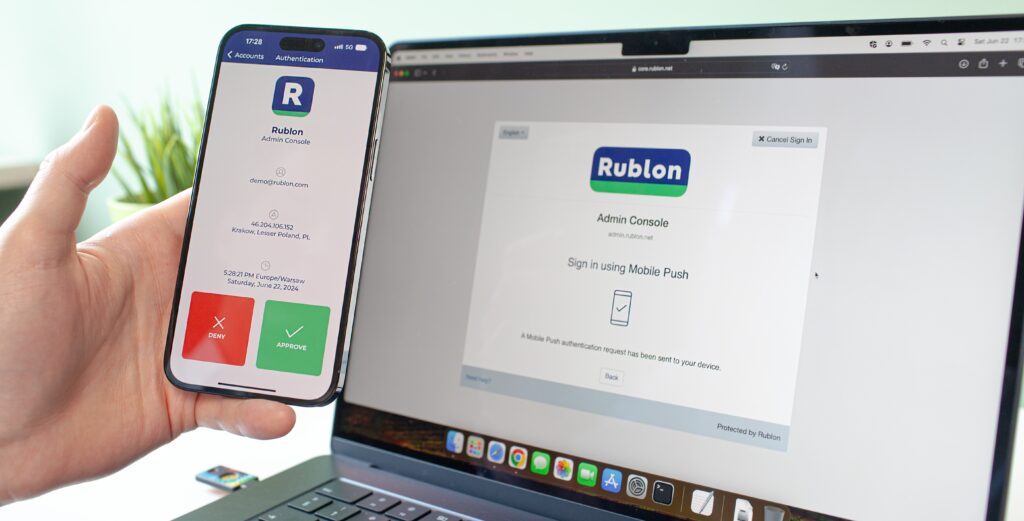
Rublon MFA is a solution that enables central management of multi-factor authentication for the entire IT infrastructure from a single administration console. Regardless of whether employees log into the corporate network, servers, endpoints or applications, Rublon provides secure access to these resources. This ensures that all logins are properly secured and access to key resources is controlled and monitored from one place.


What authentication methods are available with Rublon MFA?


Rublon offers a wide range of authentication methods, such as WebAuthn/U2F Security Key, Mobile Notification, Passcode (TOTP & Bypass Code), YubiKey OTP, QR Code, SMS Code, SMS Link, and Email Link. Users can use their mobile devices as authentication tokens by approving authentication requests using the Mobile Notification method or use a phishing-proof FIDO hardware key for the highest level of security.


What are the key features of Rublon MFA?


  • Versatility and compatibility

Rublon can be integrated with most technologies used in organizations, including VPNs, Microsoft technologies, cloud applications, and custom applications written in Java, .NET, and PHP. Rublon is compatible with Active Directory and other LDAP/RADIUS identity providers. With support for SAML, LDAP, and RADIUS protocols and dedicated plugins and connectors, Rublon MFA is a universal solution for identity and access management.


  • Innovation and scalability

Rublon MFA is developed in an Agile approach, which enables rapid implementation of improvements resulting from market needs and new technologies. The solution is always up to date with the latest trends and constantly strives for perfection. Rublon's high scalability and flexibility allows for seamless adaptation of the system to dynamically changing business needs and requirements. Regardless of the size of the organization or the complexity of the processes, Rublon is able to provide effective and secure identity management, while guaranteeing cost optimization and minimizing the risk of data breaches and unauthorized access to the organization's resources.


  • The highest safety standards

Rublon is a guarantee of the highest security standards. The company is ISO 27001 certified, and Rublon's infrastructure is monitored 24/7 by a certified AWS partner. Rublon's systems and procedures are regularly audited and pentested, ensuring compliance with rigorous security standards.

  • Compliance with safety regulations

Rublon MFA solution complies with the latest cybersecurity standards such as NIS2 Directive, DORA, GDPR, PCI DSS 4.0, FTC Safeguards Rule, HIPAA, NIST guidelines and many others.


  • Cost optimization, reliable support and easy implementation

Rublon is a solution that combines cost-effectiveness, reliable technical support, and ease of implementation. The platform is designed with ease of implementation and maintenance in mind, making Rublon an easy-to-implement and easy-to-use solution that minimizes the burden on IT teams.


What components make up Rublon MFA?


Rublon offers a set of components that work together to provide the highest level of security.


  • Rublon Prompt

The view displayed after entering correct login details. Users can select their preferred authentication method and register new authenticators themselves.


  • Rublon Authenticator

Mobile app available for Android and iOS. Can be downloaded from Google Play, App Store or AppGallery.


  • Rublon Admin Console

A control center for managing an organization's security. Administrators can configure and manage applications, users, user groups, devices, and security policies.


Try it for free today!


What technologies does Rublon MFA support?


Each of the plugins, connectors and applications has been designed to provide a secure and easy-to-use solution for identity and access management. The most important of them are:


  • Rublon MFA for Windows Logon: Enables multi-factor authentication when logging in to Windows and connecting remotely via RDP.
  • Rublon MFA for RD Gateway: Allows you to enable MFA authentication for Remote Desktop Gateway.
  • Rublon MFA for RD Web Access: Adds MFA authentication for Remote Desktop Web Access and RD Web Feed.
  • Rublon MFA for RD Web Client: Provides secure login to RD web client using multi-factor authentication.
  • Rublon Authentication Proxy: It enables multi-factor authentication when logging in to services and technologies supporting the RADIUS protocol, for example VPNs, but also to e.g. VMware Horizon View (VDI).
  • Rublon MFA for Office 365: Allows you to enable MFA for Office portal logins and Office desktop app logins.
  • Rublon MFA for OWA: It enables you to secure Outlook Web App (OWA) and Exchange Control Panel (ECP) logins with modern multi-factor authentication.
  • Rublon MFA for AD FS: Enables secure authentication with Active Directory Federation Services (AD FS).
  • Rublon MFA for WordPress: Adds an extra layer of security to your WordPress site by using multi-factor authentication.
  • Rublon MFA for Linux SSH: Provides secure login to Linux systems with multi-factor authentication.
  • Rublon MFA for Veritas NetBackup: Adds a second factor of authentication for Veritas NetBackup logins.
  • Rublon MFA for Jira & Confluence: Adds a second factor of authentication to Jira and Confluence app logins.
  • Rublon SDKs for custom apps: A set of libraries that allow you to add multi-factor authentication to your own applications written in Java, PHP, and .NET.
  • Rublon MFA for Roundcube: Allows you to enable multi-factor authentication for Roundcube.


More information about supported technologies can be found here.

HOW IS YOUR IT SYSTEM FEELING? TEST IT REGULARLY – JUST LIKE YOURSELF TO BE HEALTHY (OR YOUR CAR TO KEEP YOUR WARRANTY RIGHT)


Why is it worth commissioning an IT system audit? Why should you know if you have it?


IT systems are permanently embedded in companies. If they do not work, you cannot work at all, well-implemented they allow for effective work, excellent customer service and competitive advantage. The benefits include customer satisfaction, better employee productivity that was unthinkable 10 years ago, improved profitability and better business decisions thanks to information about the company that managers can access from anywhere in the world. 

These obvious advantages of a modern work environment may, however, cease to be available as a result of failures or attacks by cybercriminals. Identifying and assessing risks, and preventing these risks, is an important part of a manager's job. 

To achieve maximum benefits and minimize threats, reliable information about what the company's IT system really is is essential. This knowledge allows you to make the right decisions now and plan for future development. 

Many managers ask themselves the following questions: 

  • Could a company work more efficiently thanks to IT solutions? 
  • Is what I have being optimally used? 
  • Was the money on IT purchases well spent? 
  • Am I safe? Is the operation of the company at risk? 
  • How much should you spend to remove threats and when should it be done? 
  • What investments need to be made to better utilize resources? Will existing IT systems support the planned growth? 


So check what you have, check your IT department or the external company that serves your company. If you contact us, we will jointly define the scope of the audit appropriate to your needs.


What are some examples of the positive impact of IT systems on business?? 


IT systems (technological solutions and IT infrastructure) have a huge impact on the functioning and development of business. Below are some examples of the benefits that a company can gain from a good implementation of applications working on an efficient IT system. 

1. Process automation 

Example: Implementing an invoice scanning and handling system enables automatic entry of invoice data into the accounting system, eliminating manual rewriting and reducing the number of errors. 

Business benefit: Saving time and staff costs, fewer errors, faster payment approval. 

2. Improving the quality of customer service (CRM) 

Example: The use of a CRM (Customer Relationship Management) system, which collects a full history of customer contacts, allows sales and customer service departments to respond faster and propose personalized offers. 

Business benefit: Increased customer satisfaction, higher cross- and upselling sales, better market relations.

3. Better decisions with data analytics (BI) 

Example: Business Intelligence (BI) tools are used by companies to analyze sales, market trends, and website user behavior. Reports and dashboards allow managers to respond immediately to interest in specific products, fluctuations in demand, or changes in customer behavior. 

Business benefit: Better strategic and operational decisions, better matching of the offer to market needs, maximization of profits. 

4. Collaboration and communication (cloud tools) 

Example: Collaboration platforms (such as Microsoft 365, Google Workspace, and Slack) enable quick access to cloud documents, real-time collaboration, and efficient communication regardless of employees' location. 

Business benefit: Acceleration of information flow, greater flexibility of teams (e.g. remote work), lower office infrastructure costs. 

5. Data security and business continuity 

Example: IT systems with backup, encryption and threat monitoring mechanisms help protect sensitive data (e.g. customer data, sensitive data, financial information) and quickly restore system operation after a failure or hacker attack. 

Business benefit: Avoiding financial losses related to downtime, reducing the risk of penalties for improper data protection, maintaining customer trust. 

6. Supply Chain Optimization (ERP) 

Example: ERP (Enterprise Resource Planning) systems integrate production, warehouse and logistics processes, enabling, among other things, more efficient inventory planning and real-time shipment tracking. 

Business benefit: Reduction of storage and transportation costs, reduction of delays, better utilization of resources (e.g. machines). 

7. Increase your reach with e-commerce 

Example: Launching an online store (e.g. on the Shopify platform or your own system) opens up access to new markets and enables 24-hour sales. 

Business benefit: Higher revenues, the ability to acquire new customers from outside the local market, scaling the business without the need for large investments in physical infrastructure. 

8. Personalization of the offer and marketing (marketing automation) 

Example: A marketing automation system (e.g. HubSpot, Marketo) helps you create automated email campaigns, segment your audience, and track campaign results in real time. 

Business benefit: Higher effectiveness of marketing communications, better conversion rates, automatic sending of personalized offers. 

9. Increasing competitiveness 

Example: A company that builds a market advantage by offering customers modern solutions (e.g. mobile applications for ordering services or fast online payments) can gain customer loyalty more quickly. 

Business benefit: Greater market share, higher brand value, outpacing the competition in innovation. 

Each of the above-mentioned IT solutions can bring measurable financial effects to the company (including cost reduction or increased revenues), as well as significantly strengthen its position on the market through better efficiency and increased security. 


How do we collect data during an audit? 


To prepare a report, we need knowledge about the company, its processes and resources. We obtain it in 3 ways. 

1. Surveys – during conversations with company representatives we collect the following information: 

  • Management's expectations regarding the role of the IT system in the enterprise. 
  • General information about the IT system and its components. 
  • Compliance with our “Good IT System” standard. 
  • IT security solutions. 

2. Resource inventory – using appropriate tools and upon loan of internal company documents, we will examine: 

  • Procedures related to information processed in IT systems. 
  • Installed software and compliance of the actual state with the licenses held. 
  • Network equipment and its configuration. 
  • Central resources (servers, storage, backups). 
  • Processed data and access rights thereto. 
  • User computers and peripherals. 

3. Testing the resistance of IT systems to cyber threats – using specialized tools, we will perform: 

  • Detection of devices in the IT system (including unwanted ones). 
  • Vulnerability scanning. 
  • Phishing tests (on request). 


What is included in the report? 


1. General overview of the system status (Executive Summary) 

  • A short, understandable for non-technical readers synthesis of the most important information: whether the system is stable, what are the main challenges, key achievements and risks. 
  • The most important conclusions and recommendations for action. 

2. Current IT infrastructure 

  • Description of the main infrastructure elements (servers, network, end devices, cloud systems, key business applications). 
  • Information about any changes in the infrastructure since the last report (new implementations, hardware replacements, updates) – if the previous report is available. 
  • Outline of the systems architecture from a business perspective (which systems are critical, which support individual business processes). 

3. Availability and performance 

  • Availability (uptime) indicators of key systems and services over a given period (e.g. during the last quarter). 
  • Response time, application speed and possible exceedances of SLA (Service Level Agreement) standards. 
  • Information about outages (planned vs. unplanned downtime) – how many outages there were and how they were resolved. 

4. Security and compliance 

  • Major security events such as detected incidents, attempted attacks, or data breaches – with a description of how they were resolved. 
  • Status of updates for operating systems, software, and security patches. 
  • Information about security tests (e.g. penetration tests) and planned corrective actions. 
  • Compliance with legal and regulatory requirements (e.g. GDPR, industry security standards). 

5. Costs and budget 

  • Summary of IT costs incurred in the analyzed period (hardware, licenses, services, support costs). 
  • Budget utilization in relation to plan (planned vs. actual expenditure). 
  • Forecasted costs for the coming periods and proposed investments. 

6. Incidents and Reports (Help Desk / Service Desk) 

If the following data is shared, we will also describe: 

  • Number of tickets handled and response/resolution time. 
  • Recurring problems – whether modernization, additional training, hardware or software replacement is required. 
  • User satisfaction level (if the company conducts internal opinion research). 

7. Development projects and activities 

  • Status of ongoing IT projects (e.g. implementation of a new ERP or CRM system, migration to the cloud, automation). 
  • Information about planned completion dates and resources (human, financial, equipment) necessary to complete the projects. 
  • Preliminary assessment of business benefits from ongoing or recently completed projects (e.g. process improvements, cost reduction, work acceleration). 

8. Risks and recommendations 

  • Identified risks (e.g. aging infrastructure, lack of sufficient security, connection congestion, dependence on a single vendor). 
  • Estimated scale and likelihood of impact on business operations. 
  • Recommendations for risk minimization (e.g. backups in another location, additional security testing, modernization of specific elements). 
  • IT system development path (e.g. hybrid cloud implementation, new cybersecurity tools). 

9. Strategic Summary 

How the current state of the IT system supports or limits business goals. 

What are the next steps to increase efficiency and safety? 

Overall development forecast and the role of the IT department in implementing the company's plans. 

10. Attachments and detailed data (optional).


Dictionary important for managers IT related concepts 


This dictionary presents key concepts from the area of management and security in companies, including IT (Information Technology) and OT (Operational Technology) solutions. It includes definitions of systems supporting business activities (e.g. ERP, CRM, BI), mechanisms ensuring continuity of work (e.g. BIA, BCP, RPO, RTO) and threats (e.g. ransomware, hacker attack). The entries included here show how IT and OT technologies intertwine, improving not only the flow of information, but also the control of physical processes in the company. Thanks to this, you can protect resources more effectively, increase productivity and react faster to market changes. 

Process automation (process automation) is the use of technology and software to streamline repetitive tasks and procedures in a company. Thanks to this, the company can operate faster, cheaper and with less risk of human error. At the same time, employees gain more time for tasks that require creativity and decision-making. 

E-commerce (e-commerce) is a way of buying and selling products or services on the Internet. It allows customers to make purchases from anywhere and at any time, and allows companies to reach a larger audience. This allows for increasing sales reach, speeding up transactions and improving convenience for both sellers and buyers. 

Marketing Automation (andautomation of processes in marketing) is the use of tools and software that independently perform repetitive tasks, such as sending mailings, publishing content or customer segmentation. This makes it easier to reach recipients with the right message at the right time, which increases the effectiveness of the campaign. Marketing employees gain time to plan strategies and create more creative activities. 

EOD (Electronic Document Circulation) is a system that allows you to process company documents in digital form instead of paper. This allows for faster distribution of information, better version control and automation of acceptance processes. Such a system not only makes it easier to search for archived documents, but also supports cost savings and an ecological work model. 

UC&C (Unified Communications & Collaboration) that is, sGroupware systems are tools that facilitate collaboration between team members regardless of where they are located. They enable document sharing, real-time communication, and task coordination in one place. As a result, the company operates more efficiently, and decisions can be made faster and more effectively. An example of a collaboration environment is Microsoft 365, i.e. email, document libraries, and Teams. 

ERP (Enterprise Resource Planning) is an integrated software that helps manage key areas of the company, such as finance, sales, warehouse or human resources. Thanks to it, all data and processes are in one place, which facilitates cost control and better resource planning. As a result, the company can make faster decisions and respond more efficiently to market changes. Examples of ERP systems include Comarch XL, Comarch Optima, Microsoft Dynamics, Exact 

CRM (Customer Relationship Management) is a system that helps a company manage customer relationships in terms of marketing, sales, customer service and board of directors. It makes it easy to track contact history, save purchase information and preferences, so the company can better understand customer needs. As a result, you can more effectively tailor offers and provide higher quality service. Examples of CRM systems include ZOHO, Salesforce, Dymamics 365. 

BI (Business Intelligence) is a way to transform company data from various systems into useful information that helps in making business decisions. By using analytical tools and clear visualizations, managers can quickly spot trends or emerging problems. This allows them to act based on hard data, instead of just relying on intuition. 

Ransomware is malware that locks or encrypts company data and then demands a ransom to restore access. Criminals often infect systems through infected email attachments or malicious links. As a result, a company can become inoperable if it does not have an effective security plan and backups. More information on this topic in the article RANSOMWARE – HOW TO BEHAVE WHEN WE ARE ATTACKED AND HOW TO PROTECT OURSELVES TO MAINTAIN THE CONTINUITY OF BUSINESS PROCESSES on our blog.

Hacker attack is an unauthorized action that aims to breach the security of a system or network in order to steal data, disrupt operations, or perform other harmful activities. Hackers often exploit software vulnerabilities, lack of employee awareness, or social engineering methods. This can lead to the loss of confidential information, financial losses, and damage to the company's image. 

BIA (Business Impact Analysis) is the process of identifying and assessing which areas of a company are most vulnerable to the effects of downtime or failure. This allows you to set priorities in protecting key assets and business processes to minimize financial and reputational losses. In this way, the company gains the knowledge necessary to prepare effective contingency plans and maintain business continuity. 

BCP (Business Continuity Plan) is a plan that describes how a company should proceed in a crisis situation so as not to interrupt key activities. It contains procedures and resources needed to restore the most important processes in the shortest possible time, e.g. after a system failure or other unexpected event. Thanks to it, the company minimizes losses and returns to normal functioning faster. 

RPO (Recovery Point Objective) is the maximum amount of time back that a company can afford to lose data in the event of a failure or other event. Determining the RPO helps determine the appropriate frequency of backups and how to restore them. This allows the company to know to what point in the past it must go back with data to return to normal operations as quickly as possible. 

RTO (Recovery Time Objective) is the maximum time a company can afford to have key systems or processes down after a failure. Determining RTO helps determine how quickly a company should restore operations to avoid significant losses or downtime. This allows you to plan appropriate actions, resources, and emergency procedures that will ensure rapid recovery of business continuity. You can say that this is the time needed to restore a company's systems to the RPO point. 

IT (Information Technology) is a field that covers the use of computers, software, and networks to process and transmit information. It includes both hardware and systems, as well as services that enable the automation of business processes, communication, and data storage. Thanks to IT, companies can operate more efficiently, develop faster, and better respond to customer needs. 

OT (Operational Technology) are technologies and systems used to monitor and control processes in industry and other areas where the continuity of operation of machines and infrastructure is key. Unlike IT systems, they focus mainly on the physical world, supervising production, energy or transport. Thanks to OT, companies can work safely and efficiently, minimizing the risk of equipment failure. 


If you are interested in our services, please contact us by phone:

or using the form -> Contact | Upgreat

RANSOMWARE – HOW TO BEHAVE WHEN WE ARE ATTACKED AND HOW TO PROTECT OURSELVES TO MAINTAIN THE CONTINUITY OF BUSINESS PROCESSES


What is a ransomware attack?


At first it seemed to be something with the network. But then it turned out that it was not only with the network, but with everything. And not just on one computer, but on all nothing works! 

More or less like that they look symptoms of a ransomware attack. Later, a ransom demand will likely appear. These can be large amounts in hacker-safe cryptocurrencies. 

A probable attack scenario is as follows: 

  1. Infection,
  2. Reconnaissance and data theft,
  3. Encryption and ransom demand.


A ransomware attack is a shock to people and organizations. Panic sets in and we slowly realize what happened and what the consequences are. The question also arises, what to do next?! 

The first and most severe effect of the attack is that the company cannot operate. It is impossible to do anything (in most cases, literally nothing these days) similar to the lack of electricity in the office or on the production floor, with the difference that the power returns at some point, but the data unfortunately does not reappear, and the software does not start working as before. 

The attack also has a negative impact on employee morale and motivation, and on reputation with collaborators. In this case, managers must show that they have a plan to resolve the crisis, and that contacts with the company do not pose a threat to the business environment. 

Another consequence of a ransomware attack is the likelihood of data leakage. This is a significant threat to the company, its employees and partners. If the attacker believes that there will be buyers for the stolen information (this may be personal data, salary tables, PESEL numbers, passwords, data constituting trade secrets, company secrets and many others). 

The above description is just one scenario. An attack could also involve shutting down production processes in a steel mill, preventing rail communication from functioning, stopping the functioning of an e-commerce platform or preventing treatment in a large hospital. The goal of a ransomware attack is, as the name suggests, to obtain a ransom to restore access to data or restart processes in a company or organization. So the greater the financial or social costs, the larger the ransom attackers can demand.


Who can fall victim to ransomware attacks?


Everyone, including you, but the more severe the downtime, the greater the likelihood of an attack. Most often, however, cYbercriminals do not choose victims because they want to hit as many users as possible in order to make the most money. 

There have been reports of ransomware operating in accounting firms, law firms, consulting firms, the automotive, food and pharmaceutical industries, healthcare, logistics, transport, energy, mining, banking, and power engineering. As you can see, the range of interests of cybercriminals is wide. It should also be added that it is impossible to protect yourself from an attack and its effects in 100%. However, actions should be taken to minimize the probability of the attack's success and ensure the possibility of quickly restoring the systems' operation if the attack is successful.

According to article on the Government Security Center website, even large companies fall victim:

  • Garmin – WastedLocker malware, $10 million ransom payment confirmed,
  • Banco Estado Chile – Sodinokibi malware,
  • Canon USA – Maze malware,
  • Orange SA – Nefilim malware,
  • The Volksvagen Group – Conti malware.


What methods do attackers use?


There are many attack methods and they are constantly being improved. Among them are: 

  • Infected attachments and files – email attachments, files on USB drives or download links, 
  • Attacks on IT/OT infrastructure – exploitation bow in production line operating systems or SCADA controllers, 
  • Impersonating legitimate updates – ransomware pretends to be legitimate software or driver updates, 
  • Phishing and social engineering – malicious emails containing attachments or links leading to malicious websites, 
  • Exploitation of software vulnerabilities – exploiting known or previously undiscovered vulnerabilities of operating systems or applications, 
  • Attacks by service providers – use of cooperator or cooperating company software, 
  • Administrative credentials are captured – for example, via weak system administrator passwords or remote access sessions left logged in. 
  • Attacks on remote protocols (RDP) - exploitation of unsecured properly remote desktops, 
  • Attacks on network devices and servers, 
  • Ransomware injection via malicious ads (malvertising) 

As you can see, there are many methods of attacks and threats and there is much to watch out for. That is why it is worth using the competences of experienced external companies or using the knowledge of your own IT departments. 


How to behave after a ransomware attack and should you pay the ransom?


Unfortunately, there is no guarantee that the files will be decrypted after paying the ransom. This may be due to bugs in the decryption software or the attackers' lack of intention to allow decryption of the data. Additionally, forpaying the ransom reinforces the idea that their business is profitable or that they have achieved their goals. It can also be said that by paying the ransom, we are financing further activities of cybercriminals who improve their tools, which means more infections. 

But there is also good news, because sometimes it happens that some data can be recovered using publicly available decryption keys. There is also a chance that due to the specifics of some types of ransomware, some data can be recovered even without access to the decryption key. 

No matter what you need to act very quickly to prevent further hacker access to IT systems and, if possible, stop the data encryption process. The recommended actions are listed below: 

  • Isolation of infected systems: The first step should be to isolate infected systems from the network to prevent further spread of ransomware. 
  • Identify and remove threats: Using ransomware scanning and removal tools such as Malwarebytes to remove the active threat from your system. 
  • Attempting to decrypt files: Check available decryption tools on sites like No More Ransom to see if it is possible to recover your encrypted data. 
  • Restoring the system from a backup: If decryption is not possible, it is best to restore the system from a previous backup, if one is available. 
  • System analysis and security: Using analytical tools to understand how an attack occurred and implementing additional security measures to prevent future incidents. 

In a company or organization, there should be a ready plan of what to do and how to behave when business continuity is threatened or impossible. Such a plan is called a Business Continuity Plan (BCP) and its content and scope results from the analysis of what is most painful for business processes and what specific risks affect these processes. An example of an analysis of the impact on the business (BIA) is oprice of the impact of the unavailability of the financial system on the company's ability to make payments. In turn, risk analysis (Risk Assessment – RA) is aboutthe risk of a critical payment server failing due to a ransomware attack. 

In short, we should know in advance what we are most afraid of, when this threat may occur and how to prevent it. 


What formal actions should be taken?


The attack also imposes certain formal obligations on managers. These will be: 

  • Reporting the incident to the President of the Personal Data Protection Office (UODO) – this must be done within 72 hours of detecting the incident. 
  • Notification of those whose data has been leaked (employees and others). 
  • Reporting an incident to the NASK Computer Security Incident Response Team (CSIRT). 
  • Reporting a crime to the prosecutor's office or the police. 
  • There may also be an obligation andInforming shareholders or business partners (larger entities and listed companies). 
  • Even while removing the effects of an attack, it is worth creating rincident report (for internal purposes and for future audits) and create guidelines forupdating risk management procedures and security policies. 


In Poland, formal obligations in the event of a ransomware attack include reporting to UODO, CSIRT NASK and law enforcement agencies if it concerns personal data, critical systems or other resources subject to legal regulations. Quick action and documentation of the incident are essential to meet legal requirements and minimize the risk of sanctions (high financial penalties). 


How to prevent ransomware attacks?


There are a number of ways to significantly reduce the vulnerability of IT systems to ransomware. 

Among them are the following: 

  • Backups – preferably multiple copies on different media, 
  • Regular scanning and removal of vulnerabilities to cyberattacks – software updates and necessary reconfigurations, 
  • Network segmentation – limiting the possibility of ransomware spreading across the corporate network, 
  • Installing proven antivirus software with an option to prevent ransomware attacks (endpoint security), 
  • Periodic employee training to provide knowledge about current threats and ways to avoid them, 
  • Installing proven firewalls at the edge of the network that block cybercriminals from accessing IT systems from the outside, 
  • Securing remote access, for example by enabling multi-factor authentication (as in electronic banking systems), 
  • Monitoring and detecting threats – there are systems that allow for detecting attacks at an early stage, 
  • Proper policy for granting permissions to files and systems – granting users only those permissions that are necessary to perform their tasks, 
  • Incident response planning and testing. 

It is worth mentioning here that additional security for a company or organization can be provided by:protection against cyber and GDPR risks offered by some insurance companies. 


Summary


As described above, hacker attacks happen even in companies that pay attention to IT security issues, and there is no way to protect yourself from them in 100%. Protection against cyber threats is a continuous process, just as the methods of attackers are constantly being improved. However, we can reduce the chances of an attack succeeding and minimize its effects.

It is best not to be a victim, but even if it happens, remember that not everything is lost, and depending on whether and how many usable copies of data we have, we can restore the functioning of our systems. We also have a chance to decrypt some or all of the collected data.

We hope that our post will help you choose ways to protect yourself from ransomware attacks, and in the event of a threat, it will suggest what actions to take. In either case, please contact us.

By phone:


or using the form -> Contact | Upgreat


We will help.

WHAT IS ITAM AND WHAT IS IT USED FOR?


What is ITAM (IT Asset Management)?


ITAM is management process the life cycle of IT resources – from purchase, through implementation and use, to disposal. This process includes monitoring:

  • Computer hardware (servers, laptops, network devices, printers),
  • Software (licenses and subscriptions, updates, compliance with laws and regulations e.g. NIS-2, DORA).
  • And also cloud infrastructure (virtual resources, cloud services).


Why is ITAM important?


  • Cost optimization: Tracking all IT assets allows you to identify unused or unnecessary resources, which allows you to optimize operating costs.
  • Compliance with the provisions of license and subscription agreements, as well as with laws and regulations (NIS-2, DORA): ITAM helps monitor compliance with license agreements and legal regulations, minimizing the risk of financial and reputational penalties.
  • Data security: IT asset management allows you to detect and respond to potential security threats faster, protecting sensitive corporate data.
  • Operational efficiency: Effective management of IT resources streamlines internal processes, which translates into better productivity and customer and employee satisfaction.
 

What are the key elements of effective ITAM?

 
  • Asset inventory: Create an accurate record of all IT assets, including hardware, software and licenses.
  • Asset Lifecycle Management: Monitoring assets from acquisition, through use, to decommissioning.
  • Process automation: Using tools to automate asset management tasks, which increases efficiency and reduces the risk of errors.
  • Data analysis: Regularly analyze asset data to make informed business decisions.


How to implement ITAM in an organization?


  • Defining goals: Define what you want to achieve with ITAM, e.g. reducing costs or increasing security.
  • Choosing the right tools: Invest in asset management software that meets the needs of your business.
  • Team training: Ensure employees are properly trained and understand the importance of ITAM.
  • Continuous improvement: Regularly monitor and update ITAM processes to adapt to changing business needs.


Summary


ITAM implementation is a strategic step towards increasing the efficiency and competitiveness of an organization. Through effective management of IT assets, companies and organizations can not only reduce costs, but also minimize risk and improve the quality of services provided.

Are you ready to implement ITAM?

If you would like to learn more, please contact us:

Cisco Umbrella – protection against phishing, malware and ransomware

Cisco Umbrella – secure your network!


Cisco Umbrella DNS Security protects users against Internet threats such as malware, phishing, viruses and other unidentified threats known as "Zero day" threats. It protects all users, both those working in the local network and those connected remotely via VPN. Cisco Umbrella is another element of corporate network security, apart from the one we described earlier Cisco DUO.

Cisco Umbrella DNS Security is a solution available from the cloud and does not require any resources on the client's side. It works by preventing threats by blocking access to Internet resources with a low and suspicious reputation. It is based on several dozen URL categories that can be blocked or made available to users or their groups using configurable policies.

Cisco Umbrella DNS Security works by redirecting DNS queries to Cisco cloud servers, which check the reputation of websites visited by users. The whole thing is based on resources created by one of the leading cybersecurity teams - Cisco Talos Intelligence Group. Thanks to this approach, Cisco Umbrella protects against known and identified threats, but also against unknown threats by blocking access to malicious domains, URLs and files.

Cisco Umbrella DNS Security perfectly fits the needs of small and medium-sized enterprises, which have recently been frequent targets of attacks due to the lack of advanced security systems. SMEs have less specialized IT teams and limited budgets, which results in the increased use of simpler Internet gateways that do not protect against most new threats coming from the Internet. Cisco Umbrella protection is additionally extended to remote and mobile users, which can be a good complement to the security system also in larger organizations.

Cisco Umbrella DNS Security is a system configured and managed via a web browser. The management system allows for quick implementation of the basic scope of protection. The solution can be extended by integration with directory services, recognizing users and groups, assigning various policies to them, identifying workstations and their configurations, as well as collecting data and analyzing user traffic and existing threats. The whole thing is monitored using ready-made panels and tools available to the administrator.

Cisco Umbrella DNS Security can work with MDM systems managing mobile devices, ensuring their protection by redirecting DNS queries, with the Cisco DUO system providing two-factor authentication. Cisco Umbrella is an integral part of the Cisco Secure Client (AnyConnect) suite necessary for VPN connections.


What does Cisco Umbrella DNS Security do for you?

  • redirects and analyzes the correctness of DNS queries based on the Cisco Talos database,
  • protects users working on and off the network,
  • works against threats that the local antivirus system does not protect against, such as phishing, malware or unidentified threats,
  • available from the cloud with tools and panels for administration and management,
  • licensed per user with a subscription for one year or more,
  • attractive price - monthly subscription for one user - USD 4.5 (Cisco Umbrella DNS Security Essentials).


More information on the dedicated page Cisco Umbrella. Please also contact us:

Penetration testing workshops at the client's premises

Do penetration testing independently !


Penetration testing competencies for your IT team? Periodically checking the security of your IT infrastructure on your own?

We offer you 3-day, intensive practical classes in the field of IT security, which we can also organize at your company.
The program includes practical implementation of the following topics:

  • Module 1 – Preparation of the test environment (45 min.),
  • Module 2 – Information reconnaissance (90 min.),
  • Module 3 – Scanning and enumeration of systems (90 min.),
  • Module 4 – Vulnerability search and analysis (120 min.),
  • Module 5 – Using vulnerabilities to break security (120 min.),
  • Module 7 – Social engineering and backdoors (120 min.),
  • Module 8 – Penetration testing of web applications (120 min.).


Additional benefits?

  • Workshops can be held at the client's premises, so they do not require delegating employees or leaving the IT environment unattended. The workshop formula allows for flexible time management and, if necessary, handling of sudden failures or incidents requiring the participation of IT staff.
  • There are no rigid and predefined deadlines, we will adapt to the client's needs.
  • All tools presented at the workshops will be made available to participants along with training materials. In our workshops, we do not use tools that require any additional costs or licenses.
  • Each participant will receive a WLAN card used for penetration testing.
    Each participant will receive training materials and databases for testing password strength on a pendrive.


More details in the workshop agenda -> Penetration testing – workshops for clients


Contact persons:

Cisco DUO – universal multi-factor authentication

Cisco DUO – security in subscription


Multi-factor authentication, also known as MFA (Multi Factor Authentication), is currently an essential element of securing access at the edge of the network, and in environments requiring an increased level of security, also internal access to networks and applications. As part of multi-factor authentication, in addition to standard data such as user and password, an additional factor generated by the system is introduced. Only by providing three correct elements, the user can be authenticated and granted access to network resources.

Upgreat Systemy Komputerowe Sp. z o. o. is an experienced Premier Partner of Cisco Systems. We will implement two-factor authentication with Cisco DUO and secure your network.


Below are the most important features of the Cisco DUO system:

  • Cisco DUO is a cloud solution, and its implementation does not require additional resources in the customer's infrastructure. It's quick and relatively easy.
  • Cisco DUO offers the following additional authentication factor options: confirmation from a mobile application, a short SMS text message, a phone call, and a hardware token.
  • Cisco DUO provides an API compliant with the SAML 2.0 standard, allowing for easy integration with any application. This allows you to authenticate access to many applications, such as: Office 365, Salesforce, Dropbox, Zoom and others.
  • Built-in integration with directory services: Active Directory and Azure AD.
  • Integration with a wide range of remote access termination solutions. Among others: Cisco FirePower, Fortinet, Sonicwall, Paloalto.
  • The list of ready-made integration platforms can be found at https://duo.com/docs
  • In Premier and Advantage versions, monitoring the security status of customer devices, operating systems and applications and verifying their compliance with policies.
  • The infrastructure for European entities is located in the AWS environment in Europe.
  • The list price is 3$ per user per month for Cisco DUO Essentials, 6$ for Advantage, and 9$ for Premier.
  • Subscription licensing.


Contact persons: